
Anonymous Spam Callers Pretending to Be your Bank – How to Protect Yourself from Bank Fraud Scams

Updated: 2 days ago
If you receive a voicemail or phone call saying something like: “This is an important notification from Bank of America. A recent transaction from WU money transfer for $854.99 was declined. If this was you press 1. If you do not recognize this activity, call our fraud department immediately…”
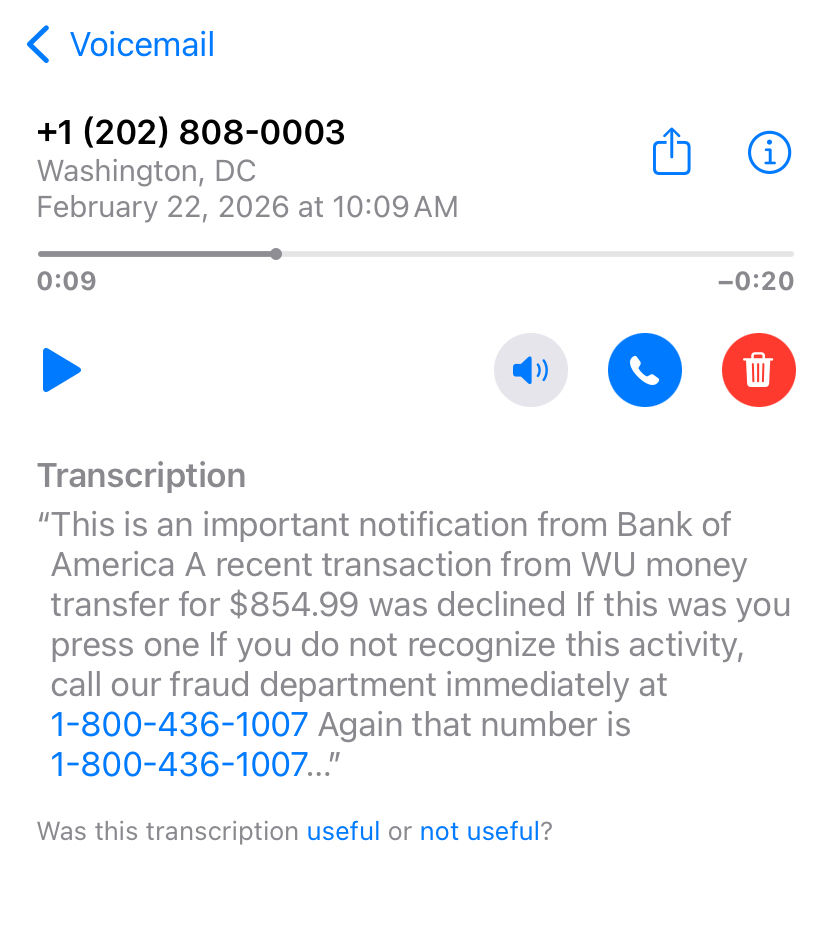
STOP.
This is a scam.
Scammers are aggressively targeting people with fake bank fraud alerts to create panic and trick you into giving them access to your money, passwords, or computer.
How the Bank Fraud Phone Scam Works
These scammers:
• Call from anonymous or spoofed numbers
• Leave urgent voicemails about fake transactions
• Tell you to press 1
• Tell you to call a fake fraud number
• Try to get you to “verify” your banking information
• Ask you to log into your bank while they’re on the phone
• Ask you to remote into your computer so they can “help”
Once you follow their instructions, they attempt to:
• Steal your online banking credentials
• Install remote access software
• Access saved passwords
• Transfer money
• Lock you out of your accounts
The voicemail you received is a classic example of a spoofed Bank of America fraud scam.
Important: Scammers Can Fake Legit Bank Phone Numbers
Here’s something most people don’t realize:
Scammers can spoof real bank phone numbers.
Even if the number looks like Bank of America or another legitimate institution, that does NOT mean it’s real. They use software to make it appear like the call is coming from a trusted source.
What You Should Do Immediately
Do NOT press any buttons.
Do NOT call the number in the voicemail.
Do NOT log into your bank while they are on the phone.
Do NOT allow remote access to your computer.
Instead:
• Log into your bank directly using your official app.
• Check if there is actually a transaction for that exact amount.
• If you’re unsure, physically go to your bank branch.
• Or call the official number listed on the back of your debit card.
Never trust a number given to you in a voicemail.
How to Protect Yourself from Bank Phone Scams
Save official bank numbers
Ask your bank for their official outgoing fraud notification numbers and save them in your contacts.
But remember:
Even saved numbers can be spoofed.
Always double check.
Use Strong Security Methods
• Enable multi-factor authentication (Authenticator app, not just SMS)
• Use strong, unique passwords
• Do not reuse passwords across banking and email
• Turn on account alerts for transactions
If You Gave Them Access to Your Computer
If you:
• Installed AnyDesk
• Installed TeamViewer
• Installed ScreenConnect
• Gave remote access
• Shared your banking login
• Entered codes they asked for
Act immediately.
Disconnect your computer from the internet.
Change your passwords from a different device.
Contact your bank immediately.
Have your system professionally checked.
Houston Tech Guys Can Help
If scammers accessed your computer, Houston Tech Guys can:
• Remove remote access software
• Cut off unauthorized connections
• Secure your accounts
• Strengthen your system security
• Implement proper authentication methods
• Perform full malware scans
• Help prevent future attacks
Bank scams are becoming more sophisticated every year. The best defense is awareness and strong security practices.
If you ever feel unsure, slow down. Scammers rely on urgency and fear.
Verify first.
Click nothing.
Call no one from the message.
Go directly to your bank.
If you believe your system or accounts may have been compromised, contact Houston Tech Guys for immediate assistance.
Houston Tech Guys
Professional IT Security & Support
Serving Houston and surrounding areas
(713) 849-2953


I actually received one of these calls recently and it sounded very convincing. Glad I read this because I didn’t realize how common these bank fraud phone scams and spoofed bank calls are. The explanation about how scammers fake numbers and try to gain access to your computer or banking info was really helpful. Definitely useful for anyone in Houston looking for cybersecurity help, scam protection, or IT support services.